Netwrix Inactive User Tracker
Free Active Directory cleanup tool for inactive accounts
Track down inactive accounts, harden your Active Directory security, and identify stale accounts before bad actors exploit them.
Close security gaps left by forgotten user accounts
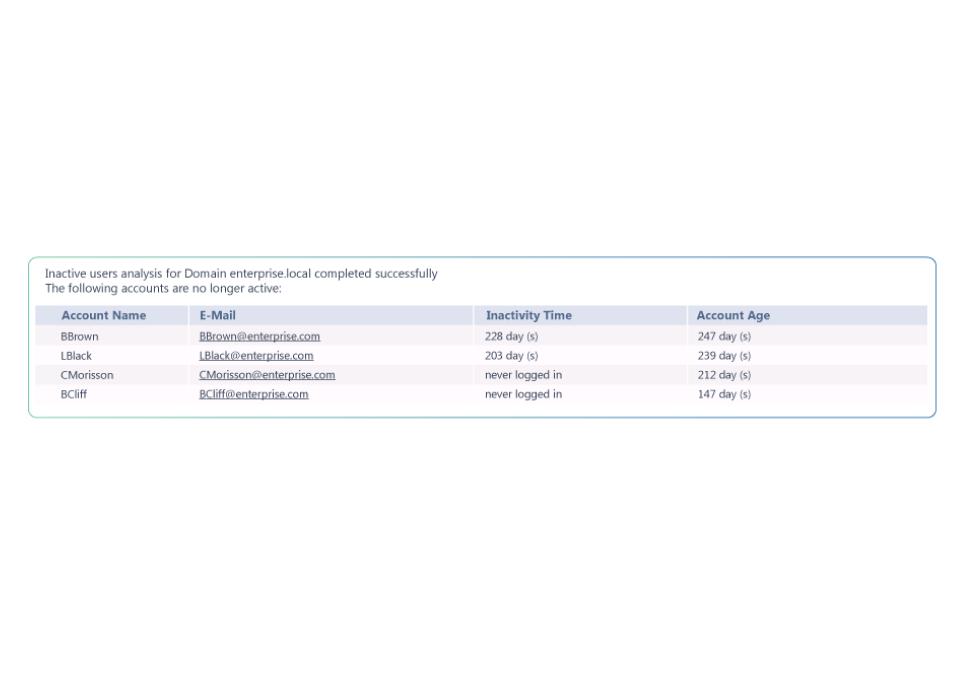
Netwrix Inactive User Tracker helps surface stale user accounts in your Active Directory. Get detailed reports on account age and idle time, then take decisive action to lock down or remove accounts before they become exploitable breach points. Automated reporting delivers insights directly to your mailbox, streamlining AD user account management and reducing attack surfaces.
Keep tabs on inactive accounts
Detect inactive user accounts and receive detailed reports that show account age and idle duration, enabling informed decision-making.
Remove stale users
Get actionable information to determine which accounts should be locked or disabled to prevent unauthorized access.
Minimize breach risk
Prevent attacks by identifying accounts that should be disabled before malicious actors can discover and misuse them.
End manual searching
Free up valuable IT resources by ending manual searches across your Active Directory. Surface accounts with automation for a streamlined workflow.
Capabilities
Free features, smarter workflows
Scheduled account discovery
Automatically scan Active Directory to identify inactive user accounts without manual intervention or complex scripts.
In-depth inactivity reports
Generate reports showing account age and inactivity duration for each stale account.
Regular email summaries
Receive regular summaries straight to your inbox so you can easily stay on top of inactive user accounts.
Easy & detailed reporting
Clear reporting helps you gather the details you need to prove security regulations are being met.
Trusted by professionals
Don’t just take our word for it
See what happens to an account before it goes dormant
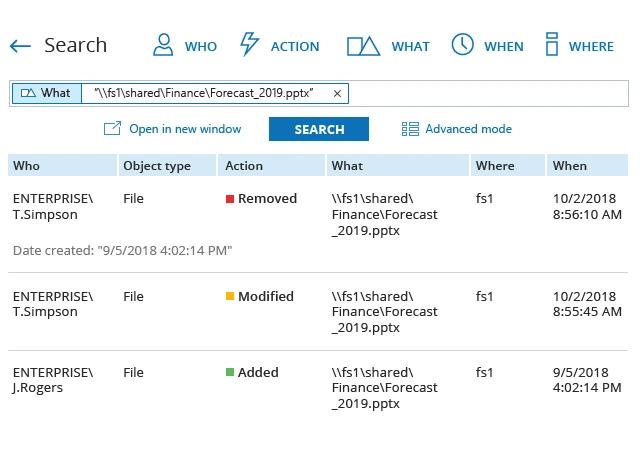
Inactive User Tracker finds the accounts nobody's used in 90 days. It won't tell you if that account was quietly added to a privileged group the week before it went dark. Dormant accounts with recent privilege changes are the ones worth investigating first.
Netwrix Auditor records before-and-after values for access and change events across hybrid Microsoft environments.
Take Active Directory hygiene further
Finding and cleaning up stale accounts is step one. These products help you audit what changed, manage the account lifecycle, and recover when something goes wrong.