
Understanding Pass-the-Hash (PtH) attacks
Pass-the-hash (PtH) is a credential theft technique where an attacker captures NTLM password hashes from memory or disk and replays them to authenticate against network services without knowing the plaintext password. The attack exploits NTLM's hash-based authentication model, enabling lateral movement, privilege escalation, and domain compromise. Tools like Mimikatz automate hash extraction and replay. Effective defense combines disabling NTLM, isolating credential stores, deploying PAM, and monitoring for anomalous authentication patterns.
Pass-the-hash is an attack where an adversary steals a user's hashed password (NTLM/LM hash) from one machine and uses it to authenticate to other systems.
Attribute | Details |
|---|---|
|
Attack type |
Credential theft and lateral movement |
|
Impact level
|
High / Critical |
|
Target |
Windows/NTLM environments, domain controllers, privileged accounts |
|
Primary attack vector |
Credential dumping (LSASS, SAM, NTDS.dit, challenge–response sniffing) |
|
Motivation
|
Financial gain, espionage, persistence
|
|
Common prevention methods |
MFA, PAM, Credential Guard, disable NTLM, LSASS protection, EDR/XDR |
Risk factor | Level |
|---|---|
|
Potential damage
|
Critical |
|
Ease of execution |
Moderate
|
|
Likelihood |
High |
Concerned about pass-the-hash attacks in your environment?
Speak with our experts to learn how to detect credential theft, stop lateral movement, and protect privileged accounts.
What is a pass-the-hash attack?
A pass-the-hash attack happens when an attacker steals a user’s hashed password (for example, an NTLM hash) from a compromised machine and reuses that hash to authenticate to other systems, without ever needing the plaintext password. Many Windows authentication processes accept a hash in place of a password, so the attacker can impersonate the user until the account’s credentials are changed or the hash is invalidated.
This attack takes advantage of weaknesses in Windows authentication protocols, particularly NTLM. NTLM and the older LM protocol use hash-based authentication methods that accept a valid hash in place of a plaintext password. LM is cryptographically weak (easy to crack) and NTLM allows the same hash to be reused across network services.
Pass-the-hash is common in Windows environments. However, Linux machines joined to Active Directory, Samba file servers, or services that support NTLM/Kerberos can all accept stolen hashes and replayed credentials. Hybrid cloud and AD-Entra ID sync setups are also vulnerable, especially where NTLM authentication or legacy compatibility is enabled. Once an attacker gains access to one system and extracts credential material from memory or disk, they can “pass” the hash to move laterally, escalate privileges, and even compromise domain controllers.
Pass-the-hash attacks exploit trusted identities rather than software vulnerabilities, making them difficult to detect. Strong identity security, least-privilege access, and continuous monitoring are essential for reducing risk.
How does a pass-the-hash attack work?
A pass-the-hash attack follows a straightforward chain, from an attacker first gaining a foothold to ultimately reaching high-value targets. Here are the common stages and what happens in each.
Initial access
The attacker obtains an entry point into the network by phishing, dropping malware, exploiting a vulnerable service, or using stolen credentials. That foothold on a user machine or server gives them the ability to run code or read memory on a target host.
Hash harvesting
Once on a host, the attacker extracts credential material (hashes or other authentication artifacts) from the compromised host or the domain. They target system stores (the local SAM database or an exported NTDS.dit), memory-resident processes that cache credentials (live LSASS memory dumps), or use replication/AD abuse (such as DCSync) to pull account data. They may also sniff network traffic where legacy challenge–response protocols are used.
Authentication with the stolen hash
The attacker reuses the captured hash to authenticate to SMB, RPC, or other services that accept NTLM (or similar) authentication, effectively impersonating the account without cracking the hash. Common tools used to perform this replay include Mimikatz, Invoke-TheHash, Sharp-SMBExec, and offensive frameworks like Cobalt Strike.
Lateral movement
Using the stolen hash, the attacker moves from the initial host to other machines. They use remote-management mechanisms (SMB shares, PsExec-like remote exec, WMIC, scheduled tasks, or built-in admin tools) to reach additional machines and harvest more credentials. They also use token stealing and impersonation to act as other users. In this way, they expand their control across the network while blending with legitimate administrative activity.
Privilege escalation
With lateral access, attackers target higher-privilege accounts (service accounts, domain admins, and built-in high-privilege SIDs such as RID-500), abuse misconfigurations (over-privileged service accounts, exposed credential stores), and exploit vulnerable services to obtain admin-level hashes. This grants them broader control and reduces the need to steal credentials repeatedly.
Persistence and objectives
After gaining privileged positions, attackers establish persistence (backdoors, scheduled tasks, changed service accounts) to stay in, even after reboots and password changes. They are now positioned to pursue objectives such as data theft, ransomware deployment, and long-term espionage.
Netwrix support
Tools like Netwrix Auditor and Netwrix Threat Manager can help detect pass-the-hash activity by continuously monitoring authentication and access patterns. They identify anomalies such as unexpected NTLM logons, privilege escalations, and unusual access to sensitive processes like LSASS. By correlating these events and real-time alerting, organizations can quickly investigate and contain potential lateral movement.
Attack flow diagram
Let’s look at a simple visual flow of the pass-the-hash attack and an example story from an organization’s perspective that shows how the attack begins with a network breach leading to privilege escalation and persistence.
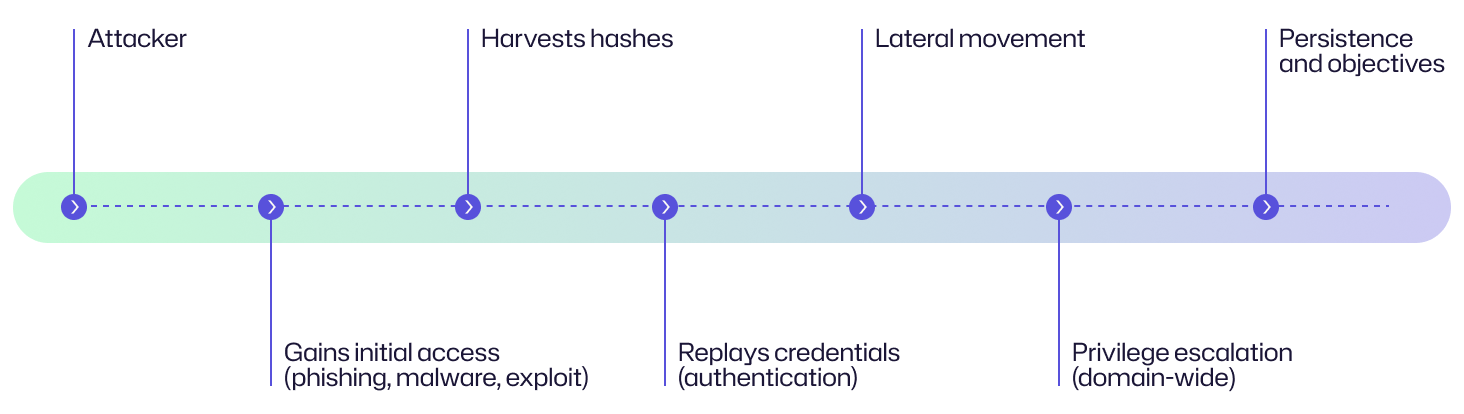
At Archie Corp, an employee opens a malicious invoice attachment, giving the attacker an initial foothold in the network. The attacker runs a loader and dumps LSASS memory to capture NTLM hashes. Using those hashes, they authenticate to an internal file server via SMB and run PsExec to reach additional hosts. From a jump host, they find a service account with high privileges and reuse its hash to access a domain controller. The attacker drops a scheduled task for persistence and exfiltrates sensitive files, then deploys ransomware.
Examples of pass-the-hash attacks
Pass-the-hash attacks show up repeatedly in real-world intrusions. Here are some actual examples that illustrate how this technique appears in ransomware and targeted campaigns.
Case | Impact |
|---|---|
|
Hive ransomware (2022)
|
In 2022, Hive ransomware operators carried out a wave of attacks that exploited the ProxyShell vulnerabilities in Microsoft Exchange servers (CVE-2021-34473, CVE-2021-34523, and CVE-2021-31207). These flaws allowed remote code execution, giving attackers an initial foothold inside corporate networks. Once inside, the attackers deployed web shells and Cobalt Strike beacons for persistence and control. They then ran Mimikatz to dump credentials from LSASS memory and extract NTLM hashes, which were reused in a pass-the-hash technique to authenticate laterally across systems, including domain controllers. With elevated privileges, Hive actors spread through the environment, disabled defenses, exfiltrated sensitive data, and finally deployed their ransomware payload. A joint advisory by CISA, FBI, and HHS stated that as of November 2022, Hive had victimized over 1,300 companies worldwide and extracted some $100 million in ransom payments. It also listed the sectors targeted by Hive: “Government Facilities, Communications, Critical Manufacturing, Information Technology, and especially Healthcare and Public Health (HPH).” |
|
HSE Conti ransomware attack (2021) |
On 14 May 2021, Ireland’s Health Service Executive (HSE) was hit by a major ransomware attack by the Conti gang, forcing the shutdown of all its IT systems nationwide. After gaining unauthorized access to HSE's IT environment on March 18, the attacker operated undetected for some eight weeks before deploying the Conti ransomware on May 14. During that time, they moved laterally through the network, compromised high-privilege accounts, and exfiltrated data from multiple sites. Conti operators used Mimikatz and Cobalt Strike to steal credentials and perform PtH attacks. They used dumped NTLM hashes to authenticate and move laterally via SMB, PsExec, and RDP. Although HSE's antivirus detected the malicious tools on March 31, 2021, it was set to monitor-only mode and failed to block the attack. |
|
NotPetya (June 2017) |
On 27 June 2017, the NotPetya wave began in Ukraine (80% of infections) and rapidly spread worldwide. It affected organizations in France, Germany, Italy, Poland, Russia, UK, US, and Australia. After initial execution, the attackers used credential-theft techniques and then leveraged remote-execution channels such as PsExec, WMIC and SMB to move laterally across networks, causing billions of dollars in damages. Vendor analyses and government writeups describe this as a “credential theft + remote exec” propagation model and note Mimikatz-style harvesting behavior, which is similar to pass-the-hash patterns seen in many ransomware campaigns. |
Consequences of pass-the-hash attacks
Pass-the-hash attacks can have far-reaching consequences because they grant administrator-level access to attackers. The damage is not limited to technical impact. It affects finances, business continuity, customer trust, and even regulatory compliance.
Impact area | Description |
|---|---|
|
Financial
|
Victims face ransom demands, data-recovery and remediation expenses, and potential financial fraud. The combined cost of downtime, system rebuilds, and lost revenue can reach millions. |
|
Operational |
By compromising administrative access to the network, attackers can disable critical systems, deploy ransomware, and halt essential business processes, leading to prolonged outages. |
|
Reputational
|
Breaches that involve credential abuse lead to loss of customer and partner trust, brand damage, media scrutiny, and potential loss of clients. |
|
Legal/regulatory |
Exposure or misuse of sensitive data can trigger GDPR, HIPAA, and SOX violations. Organizations can face lawsuits, regulatory investigations, and huge fines for non-compliance or negligence. |
Common targets of a pass-the-hash attack: Who is at risk?
Pass-the-hash attacks are most effective against systems that store, process, or accept reusable authentication hashes. Some common targets are discussed below.
Active Directory environments
Many Active Directory environments still support legacy auth like NTLM and have a huge number of privileged accounts and services. Older authentication methods plus many interconnected trusts make AD forests high-value targets, as a single compromised host can expose many accounts.
Domain controllers and Windows servers
Domain controllers and other Windows servers store and process NTLM hashes, LSASS-cached credentials, and other directory data, making them prime targets. If an attacker compromises one of these machines, they can harvest those secrets and escalate quickly.
Privileged accounts
Domain admins, service accounts, and built-in high-privilege SIDs (for example, RID-500/local admin) provide lateral reach and control. By capturing the credentials of these accounts, attackers can impersonate them and perform domain-wide actions.
Misconfigured systems
Systems with shared admin passwords, poor GPO enforcement, and cached/stored credentials (including service accounts embedded in scripts and config files) dramatically lower the barrier for pass-the-hash attacks. Weak policies and credential reuse worsen the impact of a breach.
Hybrid/cloud environments
In mixed on-premises and cloud environments, attackers can combine pass-the-hash with pass-the-ticket or Kerberoasting to target AD-joined Linux hosts, Samba servers, and Entra ID-synced identities. These hybrid setups expand the attack surface and make identity protection more complex.
Risk assessment
Pass-the-hash is a high-risk attack because it gives attackers the ability to impersonate users and take full control of an Active Directory domain with privileged credentials.
Risk factor | Level |
|---|---|
|
Potential damage |
Critical |
|
Ease of execution
|
Moderate |
|
Likelihood |
High |
How to prevent pass-the-hash attacks
Pass-the-hash attacks exploit weak authentication practices and excessive privileges. To prevent them, organizations must reduce credential exposure, lock down admin rights, and closely watch for signs of misuse. The following best practices can help.
Credential and authentication hardening
- Disable or phase out NTLM wherever possible and enforce Kerberos-based authentication. NTLM is outdated and far more prone to abuse.
- If NTLM is still needed, restrict it to NTLMv2 for stronger cryptographic protection.
- Enable Windows Defender Credential Guard to isolate LSASS and protect credential material from theft.
- Turn on LSA protection (RunAsPPL) to stop untrusted processes from reading LSASS memory.
- Disable WDigest so that plaintext passwords are not cached in memory.
Privileged access controls
- Apply the principle of least privilege (PoLP). Users should only have the access they truly need and no unnecessary admin rights.
- Use just-in-time (JIT) and Just Enough Administration (JEA) to grant temporary admin rights for specific tasks.
- Randomize local admin passwords with Microsoft LAPS or LAPS2 to prevent credential reuse.
- Never reuse local admin passwords across multiple machines.
- Add sensitive and high-value accounts to the Protected Users group.
Identity and account security
- Implement privileged access management (PAM) or a password vault to control and audit privileged credentials.
- Replace static service accounts with group Managed Service Accounts (gMSAs).
- Enforce regular and automatic password rotation for all high-value accounts.
- Require multi-factor authentication (MFA) for remote and privileged access.
- Continuously audit privileged accounts to remove inactive and stale ones.
Network and protocol defenses
- Block workstation-to-workstation SMB/RPC traffic to prevent lateral movement. You can do this by enforcing east-west segmentation, such as firewall rules or host-firewall policies that deny SMB/RPC between endpoints.
- Enable SMB signing and encryption for stronger session integrity.
- Use Remote Credential Guard to protect credentials during RDP sessions.
- Segment admin accounts by tiers (for example, Tier 0 for domain controllers, Tier 1 for servers) to contain potential breaches.
- Apply logon restrictions so that privileged accounts can only access approved systems.
IT and operational hygiene
- Patch regularly, especially for authentication and NTLM-related vulnerabilities.
- Conduct regular penetration testing and red team exercises to validate your defenses.
- Train employees to recognize phishing attempts and credential theft risks.
- Maintain golden images and immutable or offline backups for quick recovery after incidents.
- Move toward a Zero Trust model where you verify every user, device, and request continuously.
How Netwrix can help
Pass-the-hash attacks are difficult to stop with traditional defenses alone because they exploit valid credentials. Netwrix solutions strengthen identity security by detecting suspicious authentication behavior, controlling privileged access, and providing full visibility into account activity.
Netwrix Threat Manager
Threat Manager helps detect PtH activity by combining deception and behavioral analytics to spot credential-theft and lateral-movement activity.
- Deception (honeytokens): Threat Manager lets you deploy honeytokens as “bait” credentials in the environment. If an attacker tries to use or authenticate with them, it is a strong indicator of malicious credential harvesting and replay. The system will generate an alert for investigation.
- Behavioral analytics and anomaly detection: The product baselines normal user and service behavior and then flags anomalies that match credential-theft or lateral-movement patterns, for example, accounts authenticating from hosts they have never used before, sudden spikes in the number of hosts an account accesses, or unusual use of admin tools. These identity-based detections are correlated with AD, Entra ID, and file system events to reduce false positives and generate real-time alerts.
Netwrix Privilege Secure
Privilege Secure reduces the risk of stolen and reused credentials by protecting privileged accounts. It removes standing privileges, enforces just-in-time access, provides credential vaulting, and monitors privileged activity. This prevents attackers from abusing stored passwords and hashes, making pass-the-hash attacks harder to succeed.
- Zero standing privileges with JIT access: Privilege Secure issues elevated privileges only when a task is approved and automatically revokes them afterward. This eliminates long-lived admin accounts that attackers could harvest.
- Credential vaulting: The product integrates with vaults or can broker secrets itself. It centralizes privileged credentials and reduces reused passwords across endpoints. Central vaulting plus automated rotation prevents attackers from finding stable credentials to dump and replay.
- Session monitoring and audit: Privilege Secure records and monitors privileged sessions and actions (who accessed what, when, and how) for audit and forensic readiness.
- Granular privilege control and local admin rights removal: The product allows you to remove local admin rights from users, give only task-specific permissions, and centrally manage elevated access.
- Discovery of hidden privileged accounts: Privilege Secure can scan across endpoints and identify hidden and unmanaged privileged accounts.
Netwrix Auditor
Auditor gives you full visibility into user activity and system changes. It tracks logons, changes to accounts and privileges, and configuration modifications across your environment. All actions are logged with who, what, when, and where details. This makes it easier for teams to investigate unusual behavior, respond to incidents, and comply with regulations.
- Detects suspicious logons and NTLM activity: Auditor tracks all successful and failed logons (including NTLM authentication). It provides detailed audit trails showing logon times, hosts, and account use, which helps teams identify unusual logons that may indicate identity theft or a compromised account.
- Monitors privileged account usage: The product records when privileged accounts (like Domain Admins and service accounts) are used outside expected systems and hours, and raises alerts to warn teams.
- Audits changes to sensitive accounts and groups: Attackers often add compromised accounts to admin groups after using PtH. Auditor provides alerts when critical Active Directory groups are modified.
- Provides forensic audit trails: Detailed logs of who accessed what and when allow investigators to trace how stolen hashes were used.
Detect and respond to pass-the-hash attacks with Netwrix Threat Manager. Download free trial.
Detection, mitigation, and response strategies
Pass-the-hash attacks can unfold quietly. For this reason, early detection and quick response is critical. Your defense tactics should combine visibility, strict credential management, and disciplined response to reduce the damage from such attacks.
Detection
Early detection depends on spotting subtle authentication anomalies and credential abuse patterns.
Monitor Windows Event IDs
Security teams should monitor Windows Event IDs 4624, 4625, 4648, 4672, and 4688 to catch unusual logons, failed attempts, and privilege use.
- 4624: Triggered when a user or service successfully logs on. Useful for spotting unusual or unexpected logons (like NTLM network logons).
- 4625: Logged when a logon attempt fails.
- 4648: Occurs when a user or process tries to log on using explicit credentials (for example, runas, mapped drives, remote connections). Common in PtH and lateral movement attempts.
- 4672: Indicates that a logon session received elevated privileges.
- 4688: Logged when a process starts. Essential for detecting suspicious tools or scripts (like Mimikatz, PsExec, and PowerShell payloads).
Unusual access attempts to LSASS.exe
Attackers target the LSASS process to dump credential material from memory. Sysmon Event ID 10 logs direct access attempts to LSASS, for example, when credential theft tools like Mimikatz or Cobalt Strike try to read process memory. Such access is rare in normal operations, so repeated or unusual LSASS access attempts should raise alarms.
Spikes in remote NTLM authentications
Watch for unusual NTLM authentication spikes. NTLM logons of Type 3 (network) or Type 10 (remote interactive) show authentications over SMB, RPC, and RDP. A sudden increase in these events from a single account or host can indicate hash reuse for lateral movement.
NTLM activity or authentication from unusual endpoints
A rise in NTLM logons or authentications coming from previously unseen machines may suggest an attacker is replaying hashes across systems.
Workstation-to-workstation SMB or RPC activity
Normal business workflows rarely involve an employee’s workstation initiating SMB and RPC sessions with another workstation. For this reason, keep an eye on unusual east-west traffic (for example, between two user laptops) as it can signal lateral movement.
Complement log monitoring with EDR, XDR, and ITDR solutions
Endpoint detection and response (EDR), extended detection and response (XDR), and identity threat detection and response (ITDR) solutions can identify identity-based threats in real time. These tools analyze system and identity behavior across hosts. They baseline normal logon patterns and alert when an account logs in from new machines, uses outdated authentication methods like NTLM, or shows lateral movement consistent with PtH tactics.
Deploy honeypot accounts and tokens
Honeypot accounts (also called honeytokens) are fake user accounts or credentials placed in systems or memory locations that attackers usually probe. If these accounts are accessed or authenticated with, defenders immediately know that someone is harvesting or replaying credentials.
Mitigation
Pass-the-hash mitigation requires hardening credentials, tightening privileges, and segmenting trust boundaries.
Credential protection
Strong credential protection is at the heart of PtH attack mitigation. Attackers rely on stored or cached authentication data, so isolating and securing it limits their success.
- Disable NTLM or enforce NTLMv2 only: NTLM is a commonly abused authentication protocol. Disabling it entirely forces systems to use stronger Kerberos authentication. If disabling it is not feasible due to legacy dependencies, enforce NTLMv2 as it provides better cryptographic strength and helps reduce exposure to replay attacks.
- Enable Credential Guard and LSA Protection: Windows Defender Credential Guard uses virtualization-based security to isolate secrets like NTLM hashes and Kerberos tickets from the rest of the operating system. This helps prevent theft via memory dumps. Similarly, LSA Protection (RunAsPPL) ensures that only trusted, signed processes can access the LSASS process, blocking tools like Mimikatz from extracting credentials.
- Disable WDigest to stop plaintext password caching: Older Windows systems and some configurations store plaintext passwords in memory via the WDigest authentication package. Disable WDigest to prevent these plaintext passwords from being cached. This ensures that even if attackers dump LSASS memory, they only retrieve encrypted or hashed credentials.
Network and protocol controls
Network-level defenses can prevent attackers from using stolen hashes to move laterally between systems. Segmenting, encrypting, and validating traffic ensures that only legitimate communication occurs.
- Block workstation-to-workstation SMB/RPC traffic: Attackers spread laterally by reusing hashes over SMB or RPC connections between user workstations. These connections are not used for normal business operations. Block direct workstation-to-workstation communication to limit an attacker’s ability to pivot through the network after an initial compromise.
- Require SMB signing/encryption: SMB signing verifies the integrity of SMB packets and prevents tampering while SMB encryption ensures that credentials and sensitive data are not exposed in transit. Enforce these features to stop attackers from intercepting or replaying authentication traffic.
- Enable Remote Credential Guard for RDP: Remote Credential Guard prevents credentials from being sent to remote systems during RDP sessions. Instead, authentication is handled on the client side, which reduces the risk of hashes and Kerberos tickets being harvested from the remote machine.
Operational hygiene
Good security hygiene keeps credentials, systems, and configurations resilient against exploitation.
- Rotate service account passwords or replace with gMSA: Static or shared service account credentials are a common attack target. Group Managed Service Accounts automate password rotation, and frequent rotation makes stolen hashes quickly useless to attackers.
- Patch systems regularly to remove exploitable vulnerabilities: Many credential theft attacks, including PtH, begin with privilege escalation exploits that grant SYSTEM or local admin access. Keep systems patched so that attackers cannot use known vulnerabilities to reach LSASS or dump credential data.
- Regularly conduct pen tests and red teaming: Periodic penetration testing and red team exercises simulate real-world attack chains, including PtH techniques. These assessments help identify weak configurations, blind spots in detection, and gaps in lateral movement defenses.
- Train staff on phishing and credential theft awareness: Many PtH campaigns start with social engineering where a malicious email attachment or link delivers the first foothold. Regular training helps employees recognize phishing attempts, understand why credentials should never be reused, and report suspicious emails early.
Response
When indicators of PtH activity appear, quick containment and forensic investigation are key to minimizing impact.
Immediate actions
When a pass-the-hash attack is detected, contain it quickly. The goal is to limit damage, stop attacker movement, and preserve evidence for investigation.
- Reset compromised accounts to invalidate stolen hashes: Since PtH attacks rely on reused password hashes, you must reset the affected accounts immediately to invalidates those credentials.
- Quarantine affected endpoints for forensic investigation: Isolate compromised systems from the network to stop attackers from using them as pivot points for lateral movement. Analyze the quarantined devices to determine how credentials were stolen and whether additional systems are at risk.
- Contain lateral movement by segmenting infected systems: Network segmentation can block the attacker’s ability to move laterally across the environment. Place infected systems into restricted network zones, limit administrative shares, and disable unnecessary remote protocols (SMB/RDP) to contain the breach.
Forensic investigation
After containment, forensic analysis helps teams understand the scope of the breach.
- Analyze LSASS dumps, SAM, NTDS.dit for indicators of compromise: Review LSASS memory dumps, the Security Account Manager (SAM) database, and the NTDS.dit Active Directory database to reveal whether credentials were extracted and which accounts are affected.
- Review authentication logs to map attacker movement: Event logs provide a timeline of logons and privilege escalations. By correlating these events, analysts can reconstruct how the attacker authenticated across systems, identify lateral movement paths, and locate the initial access point.
- Identify persistence mechanisms (new users, scheduled tasks, GPO changes): Attackers create backdoors to regain access after password resets or system rebuilds. Look for unauthorized user accounts, malicious scheduled tasks, startup items, and modified Group Policy Objects to ensure that persistence methods are removed before recovery.
Recovery and hardening
Once the investigation concludes, focus shifts to restoring operations and strengthening defenses to prevent recurrence.
- Rebuild compromised hosts with golden images: Systems that were part of the attack should be wiped and rebuilt using trusted golden images. This completely removes hidden malware, rootkits, and registry modifications left by attackers.
- Restore from offline/immutable backups: Backups disconnected from the network or stored in immutable storage are crucial for a clean recovery. Restore from verified, untampered backups to bring systems back online quickly without reintroducing compromised data or configurations.
- Rotate high-value credentials (Domain Admin, service accounts, KRBTGT): High-privilege credentials are a prime target in PtH campaigns. Rotate these passwords, especially the KRBTGT account that issues Kerberos tickets, to invalidate stolen passwords and tokens.
- Deploy stronger identity defenses (PAM, MFA, EDR/ITDR): Introduce PAM for controlled admin sessions, MFA to prevent single-factor misuse, and EDR/ITDR solutions to detect abnormal authentication behaviors and credential misuse attempts.
Industry-specific impact
Pass-the-hash attacks affect nearly every sector, but their consequences vary depending on the type of data, systems, and regulations involved. Here is how different industries are impacted.
Industry | Impact |
|---|---|
|
Healthcare
|
PtH attacks in healthcare can lead to patient record theft, exposing sensitive medical and personal data that is protected under HIPAA. Compromised systems can also serve as entry points for ransomware attacks, which can further disrupt hospital operations, delay care, and even endanger patients. The resulting regulatory penalties and loss of public trust can have long-term effects on both finances and reputation. |
|
Finance |
In the financial sector, attackers using stolen hashes can impersonate employees and privileged users to access internal systems and initiate fraudulent transactions. The ability to move laterally within banking systems compounds the risk of large-scale breaches and insider-style fraud. This results in financial loss and exposes institutions to compliance violations under regulations like SOX or PCI DSS. |
|
Government
|
When PtH techniques are used against government networks, the impact extends beyond data loss. Attackers can perform cyber-espionage, steal classified information, and disrupt critical public services. Such incidents can compromise national security and damage public confidence in digital governance systems. |
|
Retail |
PtH attacks on retail organizations target point-of-sale (POS) systems and supply chain networks. Attackers can steal customer payment data or implant malware through trusted vendor relationships. These breaches lead to data theft, financial losses, and brand damage, especially during peak sales periods when uptime is crucial. |
Attack evolution and future trends
Launching pass-the-hash attacks once required advanced technical skill. Today, readily available automated toolkits let attackers use this technique as part of larger attack chains.
Key statistics and infographics
This section discusses some statistics and data points that show how pass-the-hash attacks impact and prevail in real life. From global survey findings to breach investigations, credential theft and reuse play a central role in cyber incidents.
- According to the 2026 Verizon Data Breach Investigations Report (DBIR), the use of stolen credentials was involved in 36% of breaches, while 62% of all breaches included a human element such as social engineering, privilege misuse, and credential theft. These findings highlight how credential compromise remains a persistent and significant factor in cyberattacks.
- Compromised credentials were the root cause of 23% of ransomware attacks, according to Sophos's The State of Ransomware 2025 report. Credential-based attack techniques, including pass-the-hash, are among the methods that contribute to this vector. When combined with other credential-based attack vectors, stolen or misused credentials remain one of the most significant enablers of ransomware deployments.
- According to the Sophos Active Adversary Report 2025, compromised credentials were the leading root cause in 41% of incident response cases investigated in 2024. Microsoft and other security vendors continue to warn that LSASS credential dumping, a key step in PtH attacks, remains one of the most common ways attackers gain the credentials needed to move laterally through enterprise environments.
Initial access vector breakdown (2025)
The following data, drawn from Mandiant's M-Trends 2026 report, shows that stolen credentials accounted for 9% of identified initial access vectors in 2025, underscoring their continued role as an entry point attackers use to move laterally and escalate privileges once inside.
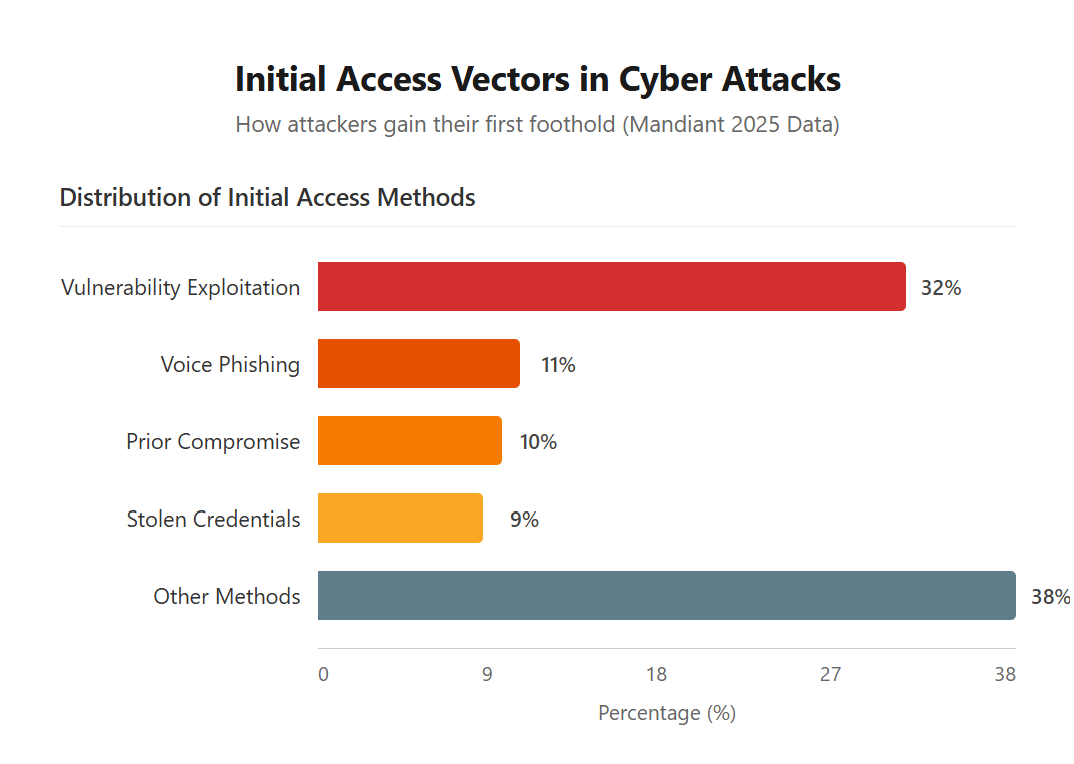
From Mandiant's 2025 data:
- Vulnerability exploitation: 32%
- Voice phishing: 11%
- Prior compromise: 10%
- Stolen credentials: 9%
- Other Methods: 38%
Final thoughts
Pass-the-hash attacks have been around for decades, and they still work because they exploit something fundamental about how Windows authentication operates. You can’t just patch this away or hope that it will not happen to you. Defenses against PtH are well understood, and they’re effective. Privileged access workstations, credential tiering, monitoring for lateral movement are controls that hold up in practice.
Cached credentials are a real and accessible target. Lock down the paths that lead there. Don't wait until you’re in incident response to find out where the gaps are.
FAQs
Share on

View related cybersecurity attacks
Abusing Entra ID Application Permissions – How It Works and Defense Strategies
AdminSDHolder Modification – How It Works and Defense Strategies
AS-REP Roasting Attack - How It Works and Defense Strategies
Hafnium Attack - How It Works and Defense Strategies
DCSync Attacks Explained: Threat to Active Directory Security
Ultimate guide to Golden SAML attacks
What Is a Golden Ticket Attack? How It Works, Detection and Prevention
gMSA exploitation attacks and Golden gMSA attacks explained
DCShadow Attack – How It Works, Real-World Examples & Defense Strategies
ChatGPT Prompt Injection: Understanding Risks, Examples & Prevention
NTDS.dit extraction attacks explained
Kerberoasting Attack – How It Works and Defense Strategies
Pass-the-Ticket Attack Explained: Risks, Examples & Defense Strategies
Understanding password spraying attacks
Plaintext Password Extraction explained: Risks, examples & prevention
Zerologon Vulnerability Explained: Risks, Exploits and Mitigation
A complete guide to ransomware attacks
Skeleton Key attack: How it works and how to detect it
Lateral Movement: What Is It, How It Works And Preventions
Man-in-the-Middle (MITM) Attacks: What They Are & How to Prevent Them
Why Is PowerShell So Popular for Attackers?
4 Service Account Attacks and How to Protect Against Them
How to Prevent Malware Attacks from Impacting Your Business
What is Credential Stuffing?
Compromising SQL Server with PowerUpSQL
What Are Mousejacking Attacks, and How to Defend Against Them
Stealing Credentials with a Security Support Provider (SSP)
Rainbow Table Attacks: How They Work and How to Defend Against Them
A Comprehensive Look into Password Attacks and How to Stop Them
LDAP Reconnaissance
Bypassing MFA with the Pass-the-Cookie Attack
Silver Ticket Attack