File System Auditing:
Who Accessed What Files and Where?
Learn how you can track all changes and get audit reports that include the four W's: Who, What, When, and Where for every audited file change, permission change, or access attempt.
Enter your details to register for the webinar:
First Name:
Last Name:
E-mail:
Time Slot:
RegisterCancel

Netwrix File Server Change Reporter

Configuration auditing for file servers and storage devices

Available Reports

The following predefined reports are available in the Enterprise edition of the product. You can easily create your custom reports or order them from Netwrix Professional Services. Up to 3 custom reports can be provided at no charge with every purchase.

Name Description
All File Server Changes Shows all created, deleted, and modified files, folders, shares, and permissions. This report is very useful for compliance audits to show that all data modifications are traceable and auditable. Download sample.
All File Server Changes by Object Type Shows all created, deleted, and modified file server objects and permissions, grouped by object type: file, folder, share.
All File Server Changes by Server Shows all created, deleted, and modified files, folders, shares, and permissions, grouped by file server name.
All File Server Changes by User Shows all created, deleted, and modified files, folders, shares, and permissions, grouped by user name who made changes.
All File Server Changes by Date Shows all created, deleted, and modified files, folders, shares, and permissions, grouped by modification date. This report is very useful for compliance audits to show that all data modifications are traceable and auditable.
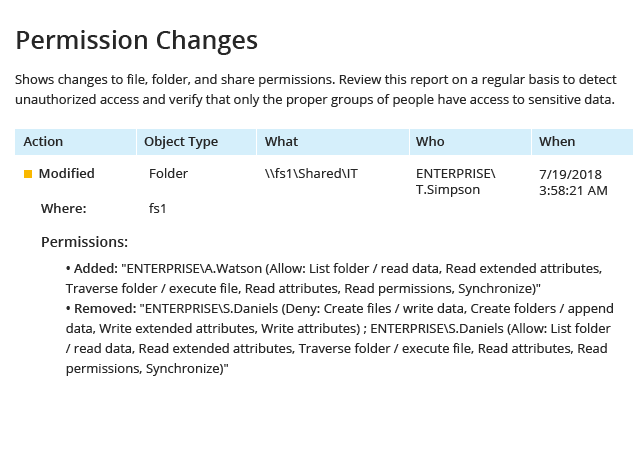
Permission Changes Shows changes in file, folder, and share permissions in the specified time frame. This report must be reviewed on a regular basis to detect unauthorized access and verify that only allowed groups of people have access to sensitive data.
Files and Folders Created Shows all newly created files and folders for a specified period of time. This report can be used to analyze growth of disk space usage.
Files, Folders and Shares Modified Shows who changed what files, folders and shares, and when, including permission changes. You can restore modified files to their previous versions if file versioning is enabled in program options.
Files and Folders Deleted Reports who deleted what files and folders and when. This report should be reviewed regularly to prevent data loss and initiate file restore from backup as soon as possible.
Failed Write Attempts Reports all attempts to change files, folders, and permissions that failed due to lack of access rights. This report must be regularly reviewed to track unauthorized access attempts.
Failed Write Attempts by Date Shows all failed attempts to write to files and change permissions, grouped by date.
Failed Write Attempts by Server Shows all failed attempts to write to files and change permissions, grouped by server name.
Failed Write Attempts by User Shows all failed attempts to write to files and change permissions, grouped by user name. This report can be used to show what users were trying to gain unauthorized access.
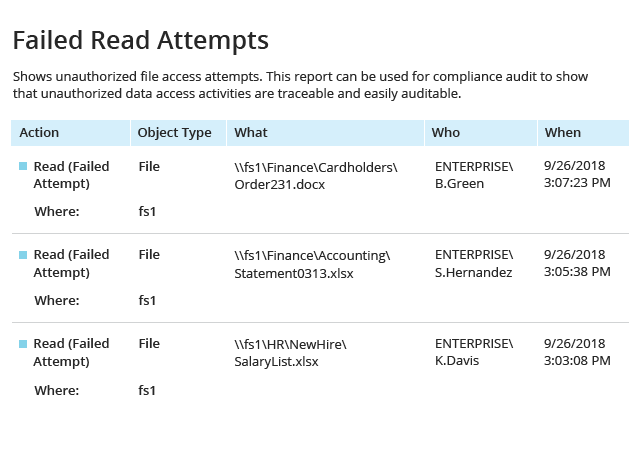
Failed Read Attempts Reports all unauthorized file access attempts. This report can be used for compliance audits to show that all unauthorized data access activities are traceable and easily auditable.
Failed Read Attempts by Date Reports all unauthorized file access attempts, grouped by date. This report can be used for compliance audits to show that all unauthorized data access activities are traceable and easily auditable.
Failed Read Attempts by Server Reports all unauthorized file access attempts, grouped by server name. This report can be used to analyze what file servers are subject to unauthorized access attempts.
Failed Read Attempts by User Reports all unauthorized file access attempts, grouped by user name. This report can be used to analyze what users are trying to access restricted data and how often.
Successful File Read Attempts Shows all file read attempts that were successful. This report can be used for compliance audits to show that all access to sensitive information is traceable and auditable.
Successful File Read Attempts by Date Shows all file read attempts that were successful, grouped by date. This report can be used for compliance audits to show that all access to sensitive information is traceable and auditable.
Successful File Read Attempts by Server Shows all file read attempts that were successful, grouped by server name. This report can be used to analyze what servers are being accessed.
Successful File Read Attempts by User Reports what users read what files and when, grouped by user. This report can be used to analyze all access attempts by specific users.

Current customers: Need more reports? Contact us and we’ll create up to 3 custom reports at no charge.
Microsoft Gold Certified Partner